VeinzPay for business
New in 4.0 · PalmPay is now VeinzPay

Every counter on campus. One palm. One PC.

VeinzPay is the whole payments stack for a campus, a housing society or a company canteen: palm-vein terminals at the counters, a wallet on every phone, a dashboard for every shop and a ledger you can audit — installed on a Windows PC you already own.

  • AES-256-GCM at rest
  • TLS 1.3, pinned
  • Hash-chained ledger
  • No cloud account
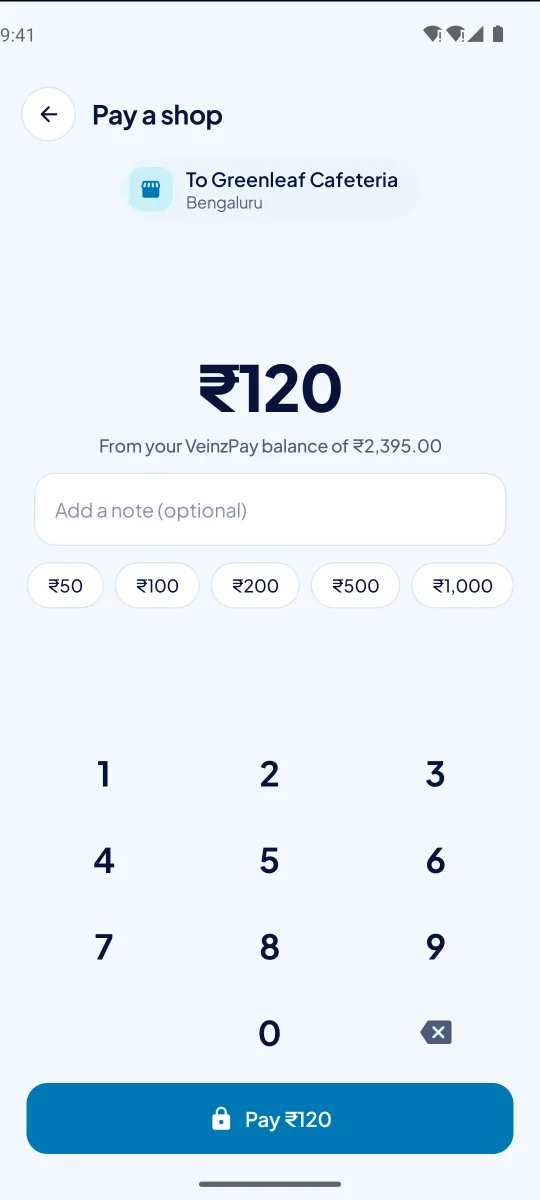
Greenleaf CafeteriaCounter 1
₹85.00
Hold your palm over the sensor Reading the veins… Recognised · asking your PC Paid · Aarav M.
PIN from ₹1,000
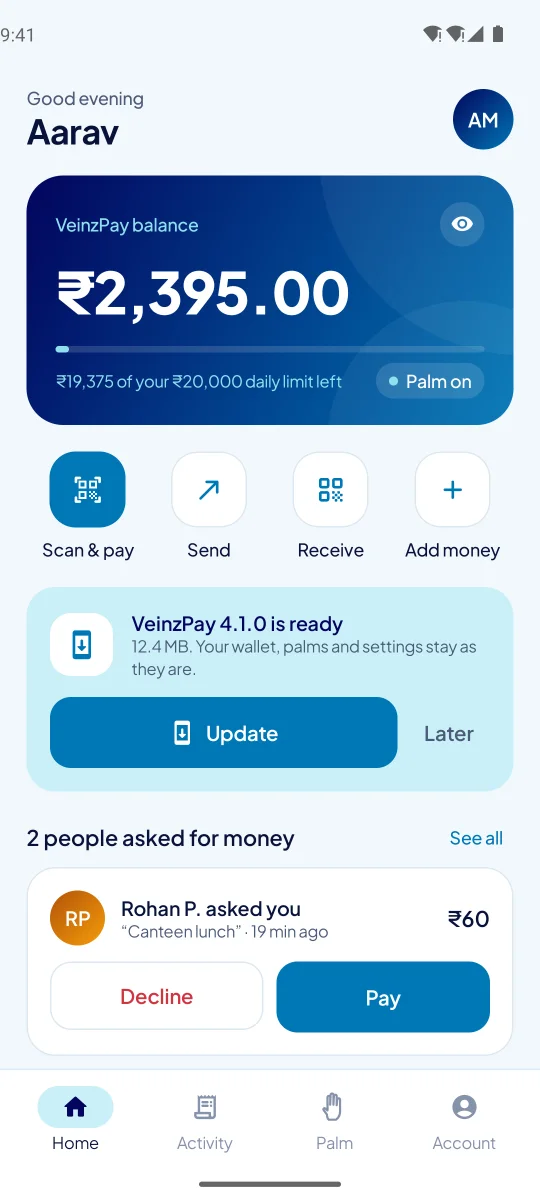
The VeinzPay wallet: balance, today's remaining limit, and quick actions
Paid ₹85 at Greenleaf CafeteriaVeinzPay · just now
LEDGER #592 · 3f9a1c…e2debits = credits · chained to #591
9 ms

to authorise a charge, typically — 36 ms at the 95th percentile

210/s

charges from five terminals at once, on an ordinary desktop PC

~1 s

from the PC starting to the counters taking payments again

11

languages in the wallet — every screen, message and receipt

Measured on the home-server PC against a year of a busy campus: 5,000 customers with palms, 110,000 transactions.

01 — How it works

One payment, start to finish.

Scroll through what a customer does, and what VeinzPay checks at every step.

  1. 01

    Link a palm, once.

    At any counter, the customer reads out a link code from the app and the terminal takes five quick captures. What's kept is a mathematical template of the veins beneath the skin — not a photo — and it can't be turned back into a picture of a hand.
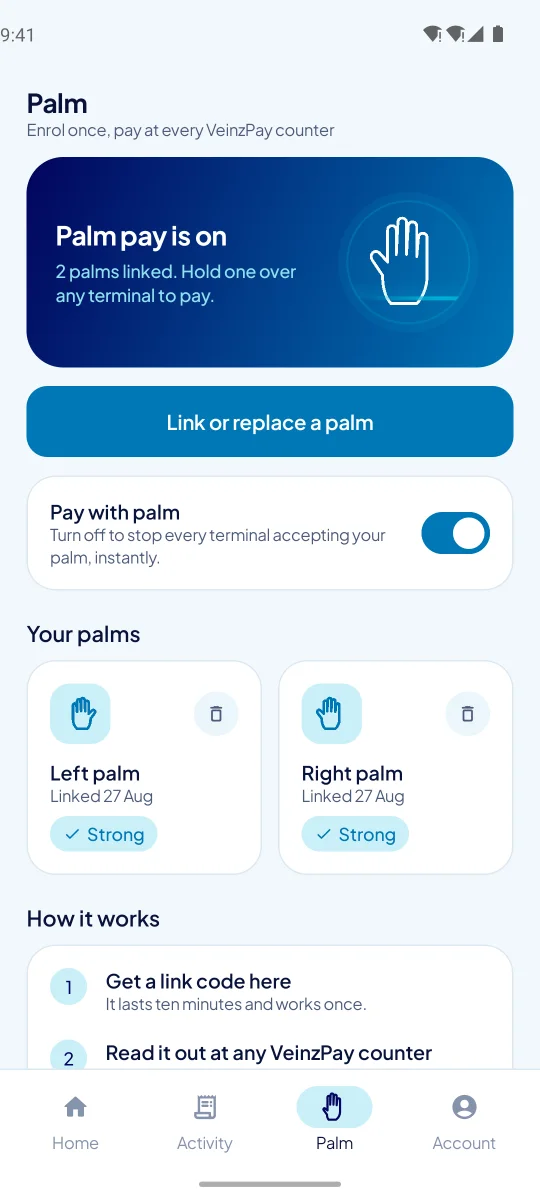
    The Palm tab: which hands are linked, and the switch that turns palm payments off everywhere
  2. 02

    Hold a hand over the terminal.

    The terminal finds the palm among the ones it holds, then asks your PC. The platform decides — balance, daily and per-payment limits, a frozen wallet, and a PIN for bigger amounts — and the payment lands on the customer's phone before they've put it away.
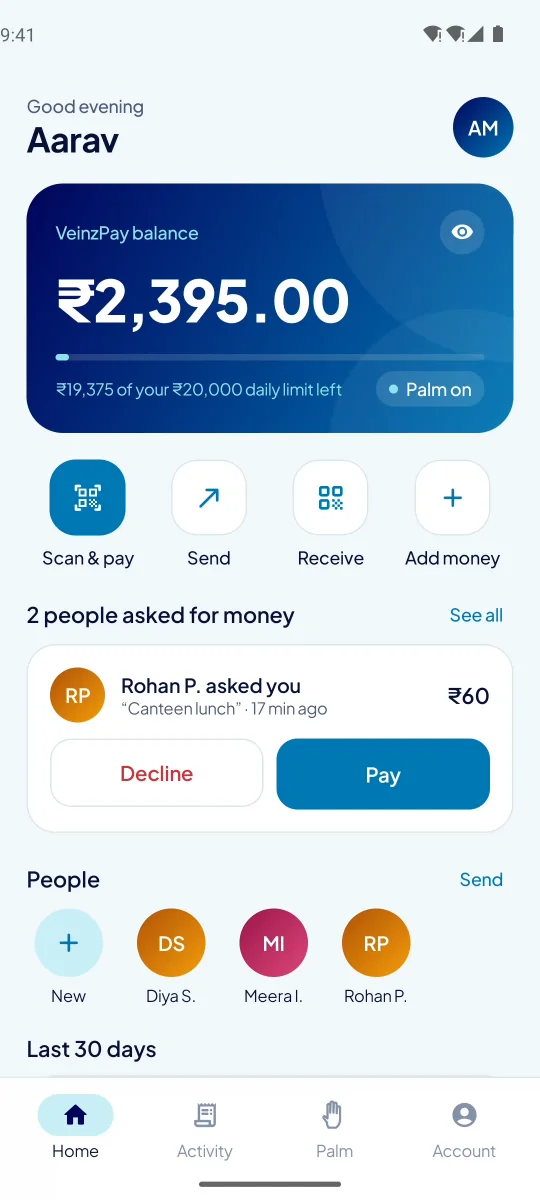
    The wallet's home screen after a payment
  3. 03

    Send, ask, split, scan.

    Wallet to wallet by mobile number or QR code, requests with Pay and Decline, a bill split between friends in one go, a shop's printed VeinzPay code — and any UPI code, handed to the phone's own UPI app.
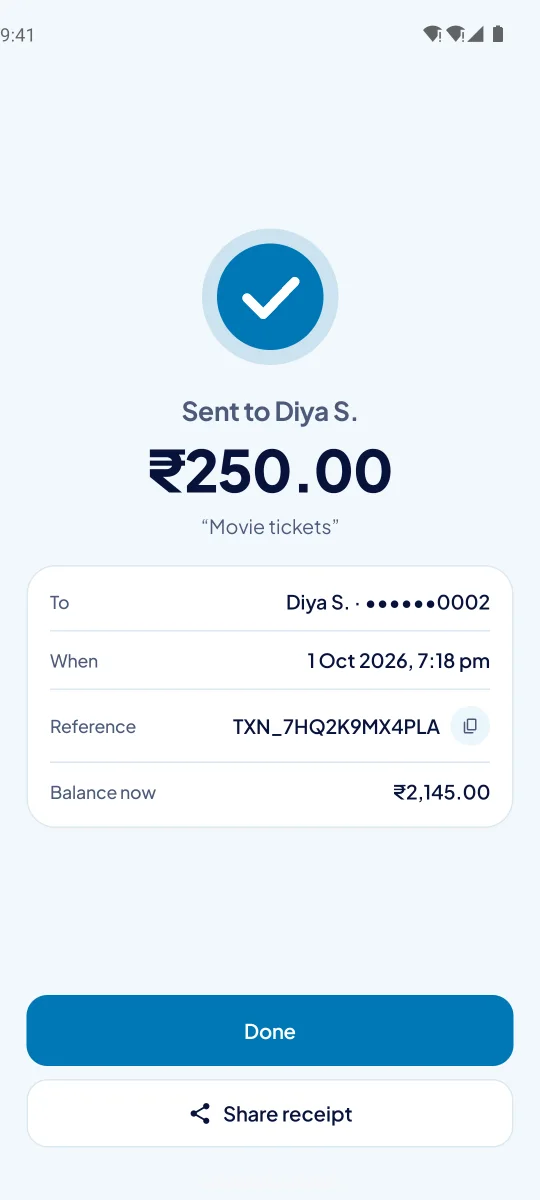
    Money sent to a friend, with the receipt
  4. 04

    A statement a bank would recognise.

    Any month, as a PDF generated from the ledger: opening and closing balance, money in and out, and every movement with the balance after it.
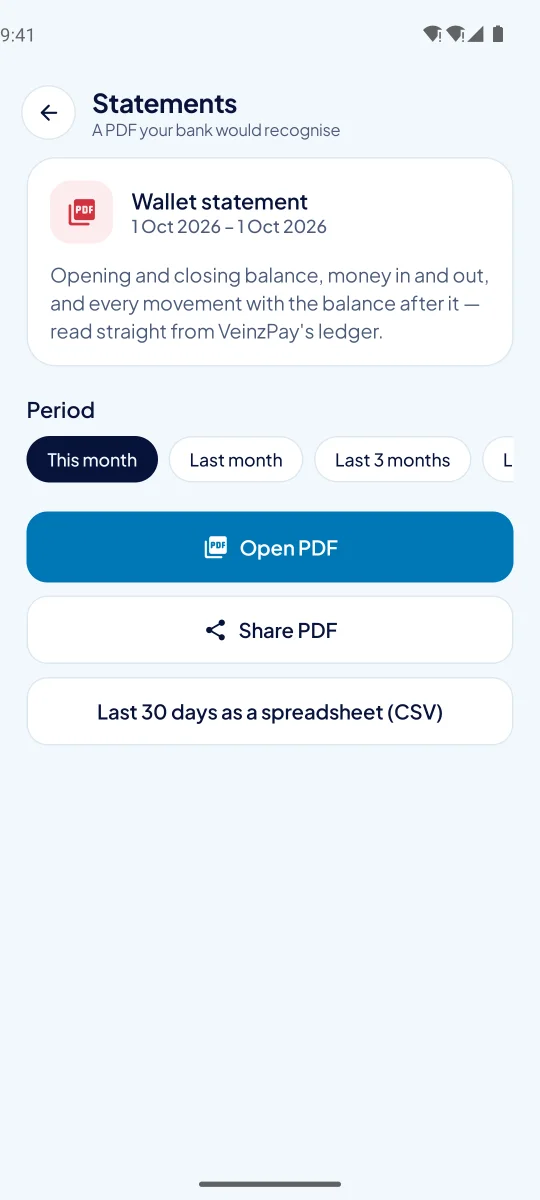
    Choosing a statement period
  5. 05

    In the customer's own language.

    Hindi, Bengali, Marathi, Telugu, Tamil, Gujarati, Kannada, Malayalam, Punjabi, Odia or English — picked on the welcome screen, or following the phone. Names and amounts stay exactly as they are.
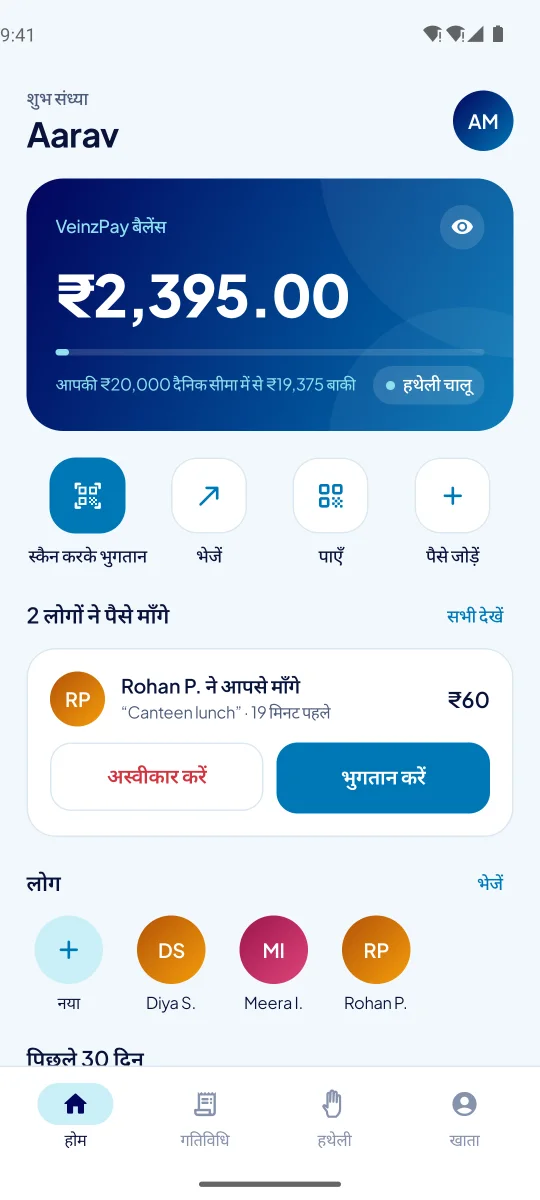
    The wallet's home screen in Hindi
02 — Languages

The counter speaks everyone's language.

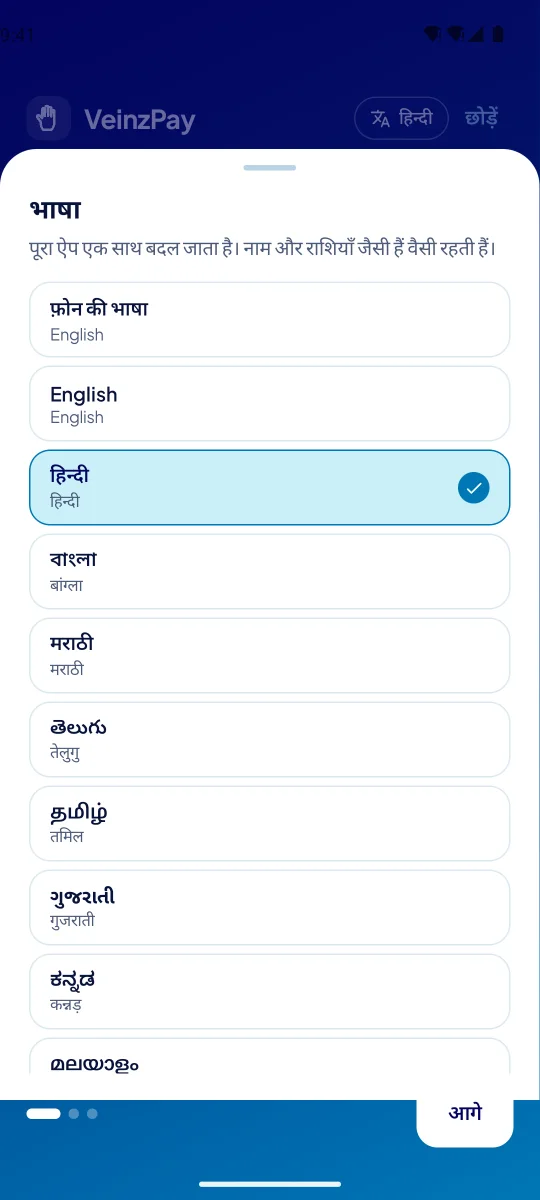
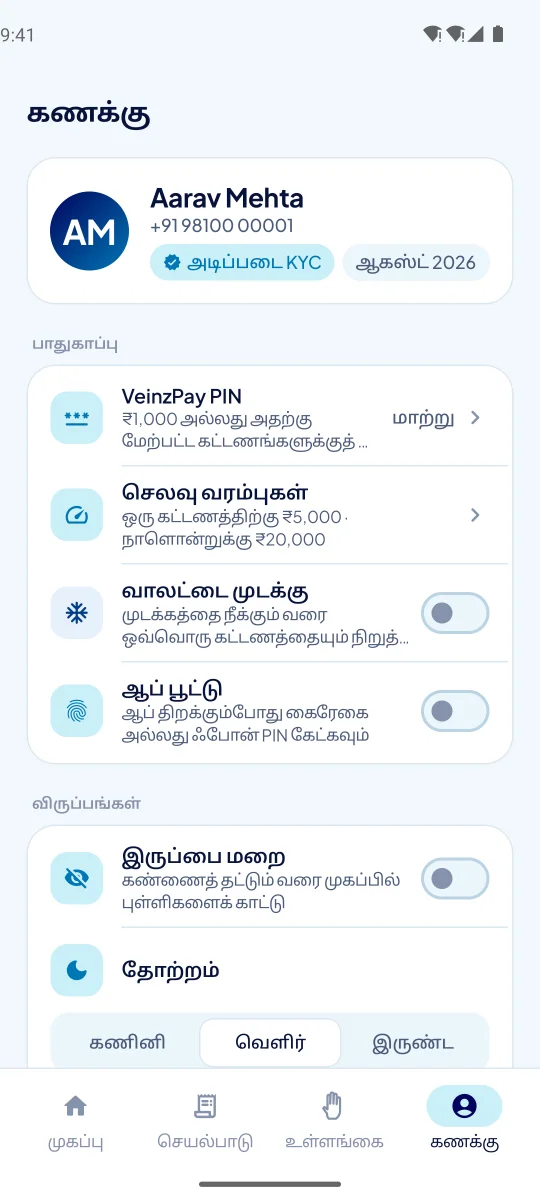
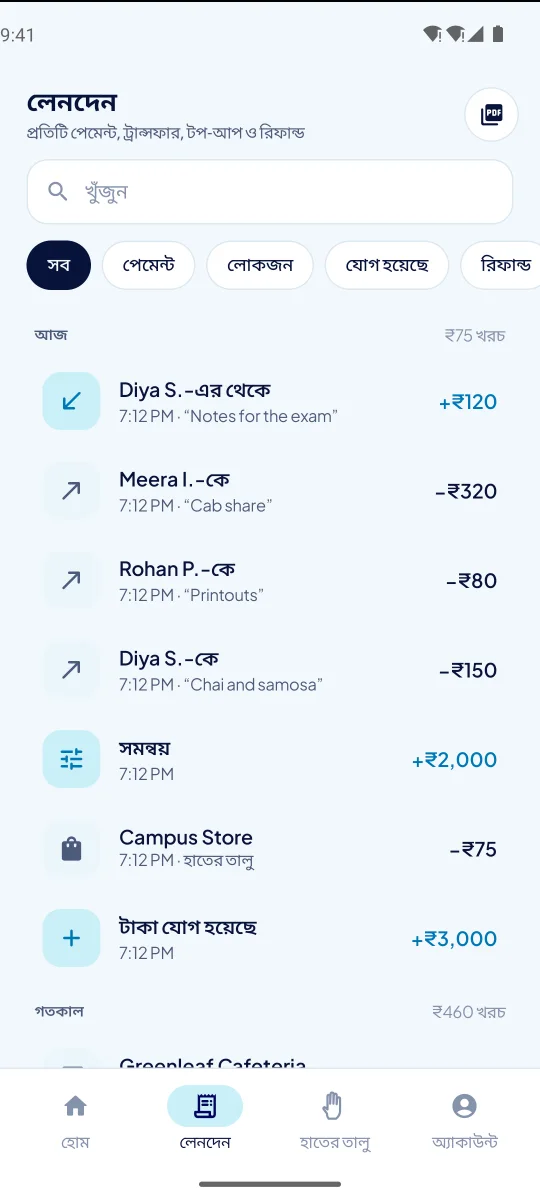
All 614 sentences the wallet shows — every button, error and shared receipt — in ten Indian languages, written the way the payment apps people already use speak. The release build refuses to ship if a single sentence is missing.

The language picker, every language in its own script
The Account screen in Tamil
Activity in Bengali
03 — Product

Five apps. One platform. Nothing to rent.

Everything a counter, a shop, a customer and an operator need, sharing one ledger on your PC.

Merchant dashboard · browser and app

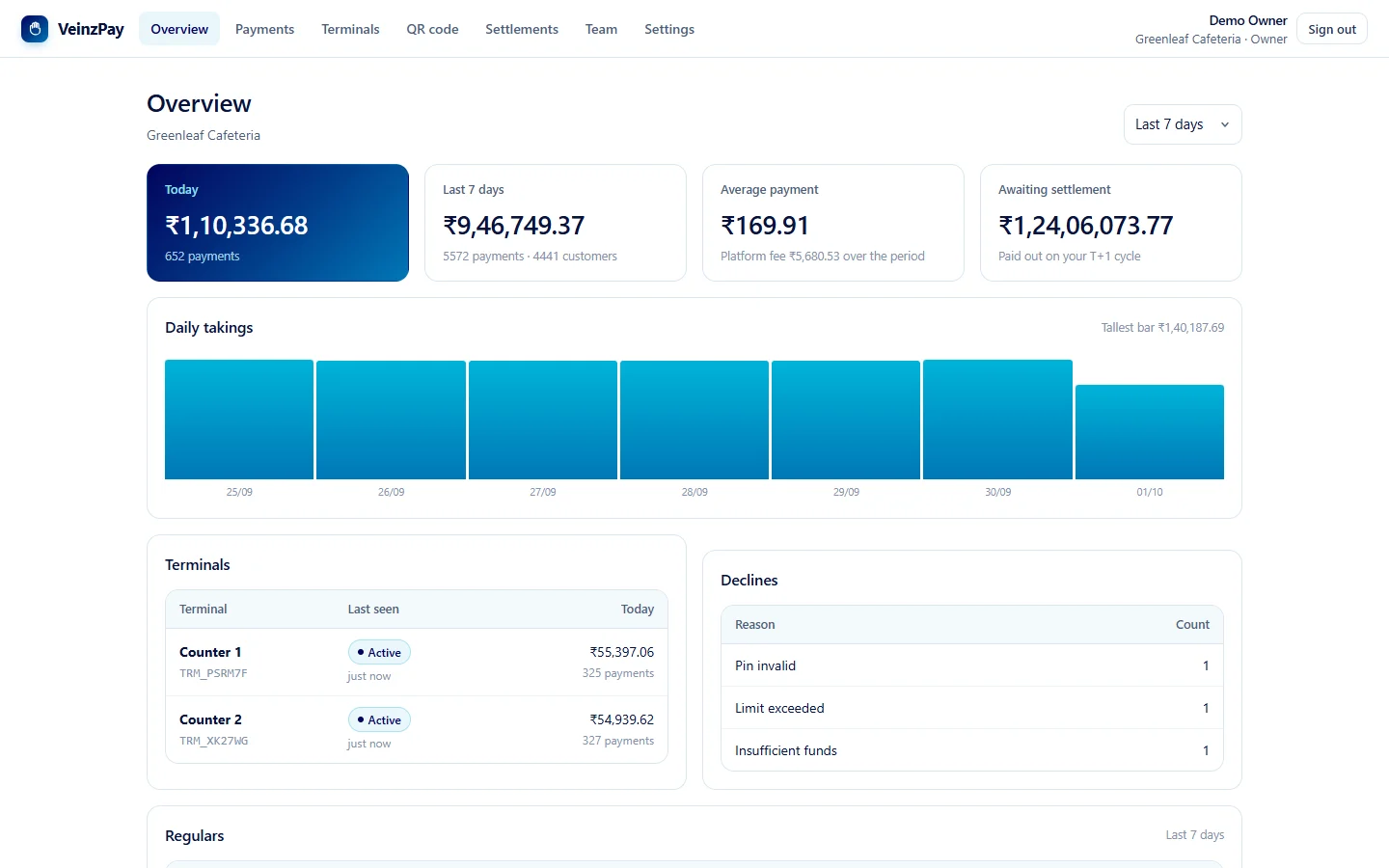
The numbers to run a shop.

Takings by day and by counter, regulars, refunds straight back to the customer with the reason on record, a printable QR poster, and settlements followed to their bank reference. Owner, manager and cashier sign-ins, each allowed exactly what the role needs.

The merchant dashboard
Terminal

A handheld with a palm-vein sensor.

A 5-inch Android POS (RK3568). Pairs with a one-time code. Offline, it holds payments and sends them later without charging twice. Lost? Revoked in one tap.

Wallet · Android, iPhone build

Money people can see and control.

Palm on or off everywhere, limits on sliders, a PIN for big payments, app lock, statements, transfers and UPI.

Paying a shop by its QR code
Operator console · browser and app

The whole network on one screen.

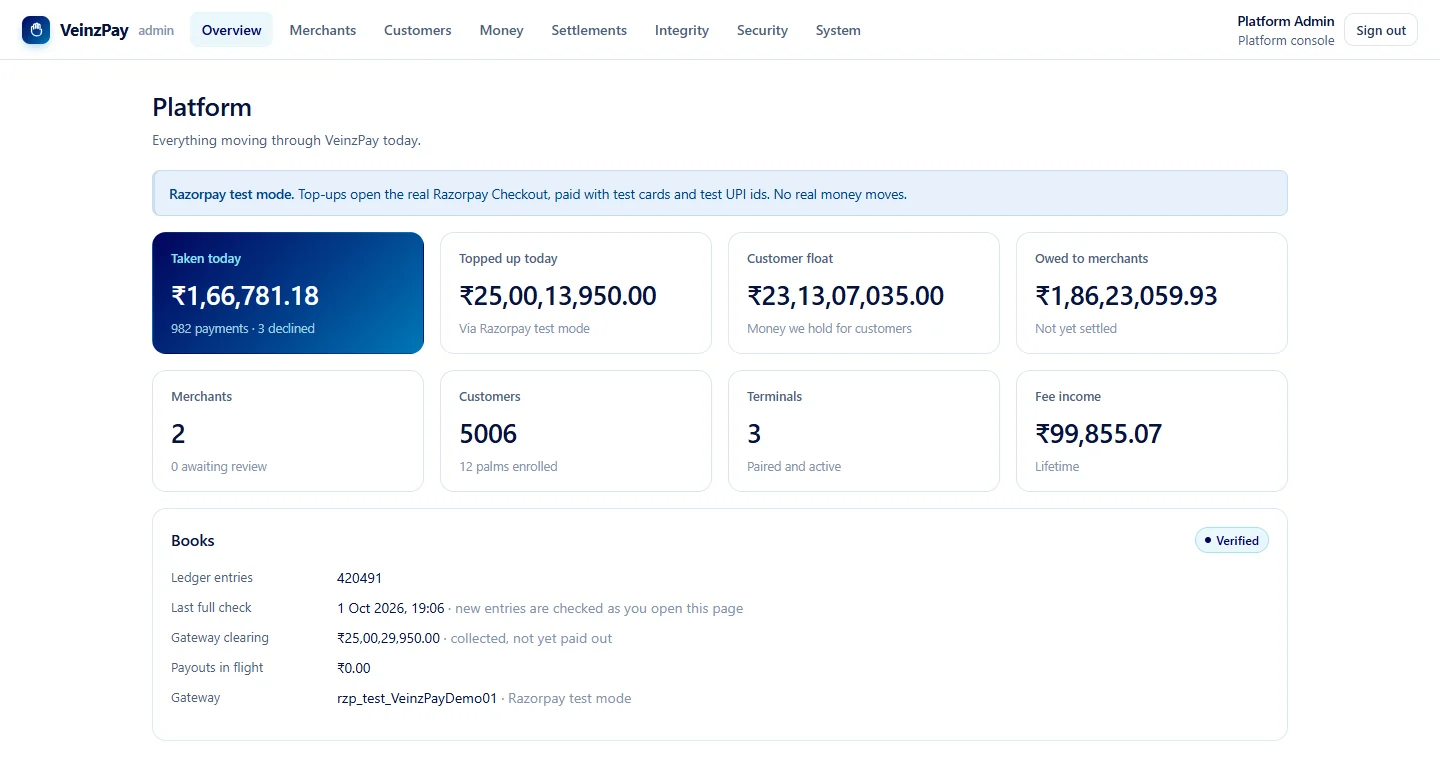
Approve shops and set each one's rate and settlement cycle, freeze a wallet, check the ledger, and see every protection — with its evidence — on one Security page.

The operator console
Server Manager · Windows

One installer. Upgrades that roll back.

The new version is prepared beside the running one; if anything fails, the old one comes straight back.

  1. ✓Backed up the databasefirst
  2. ✓Prepared 3.12.0 beside 3.11.0running
  3. ✓Switched over18 s
  4. ✓Ledger intact, database OKchecked
  5. ✓3.11.0 kept to roll back toapp.previous
Since 3.12

Apps that update themselves.

Phones and terminals fetch new versions from your PC, check them against its checksums and VeinzPay's signing key, and ask before installing.

The update card on the wallet's home screen
04 — Platform

Runs on one PC. Looks after itself.

Wallets, ledger, terminals and dashboards on one ordinary computer on your network. No database server, no containers, nothing in someone else's cloud.

Terminals reach the PC over the local network with pinned TLS; phones reach it over the internet through an HTTPS tunnel; backups go to a second drive, encrypted; alerts go to the owner's phone. Counter 1 Counter 2 Counter 3 Your PCVeinzPay 3.12 Wallets Merchant app Operator app Backups · 03:00 · encrypted copy Alerts · your phone shop Wi-Fi · TLS 1.3, pinned key internet · HTTPS tunnel Phones reach the PC over the internet through an HTTPS tunnel; terminals reach it over the shop's Wi-Fi with pinned TLS; alerts go to the owner's phone and backups to an encrypted copy. Wallets Merchant Operator Your PCVeinzPay 3.12 Alerts · phone Backups · 3:00 Counter 1 Counter 2 Counter 3 internet · HTTPS tunnel shop Wi-Fi · TLS 1.3, pinned key

Starts with the PC

And restarts itself if it ever stops; a watchdog catches hangs. Ready to take payments about a second after starting.

Backups every night

Taken at 3:00 while payments carry on, each opened and checked before it's kept. The copy on a USB drive or cloud folder is encrypted whole.

Alerts on your phone

A terminal gone quiet, a failed backup, a lost internet link, a clock that's drifted — and a summary of each day that ends with the ledger's fingerprint.

An address that repairs itself

If the internet tunnel stops answering, the platform checks it from outside and registers it again — no port forwarding, even behind your ISP's NAT.

Fast where it counts

One flush to disk per payment, indexes for the questions shops ask most, and dashboards worked out once per change — 3 ms, eight people refreshing.

Upgrades that can't take it down

Prepared beside the running version and switched over once it's ready; if anything goes wrong, the old one comes back by itself.

05 — Security

Security you can check, not just trust.

Every protection is listed on the operator console's Security page with the evidence behind it — and each one comes with a way to check it yourself.

#589a41e…07
#59077c2…b9
#5911ead…73
#5923f9a…e2

Each ledger entry carries the hash of the one before. Change a rupee anywhere and the chain breaks from there on — and a fingerprint of the newest entry goes to your phone every night.

  • AES-256-GCM

    Palms and bank details, sealed

    A copied database or backup shows nothing readable. Rotate the key whenever you like; older backups still open.

  • TLS 1.3 · P-256

    Every connection encrypted

    On the shop's Wi-Fi the apps pin your PC's own key. Old and weak ciphers are refused outright.

  • scrypt

    Passwords and PINs, hashed slowly

    Five wrong PINs in an hour pause that wallet's PIN payments at every counter at once, and in the app.

  • SHA-256 chain

    A ledger that shows tampering

    Double-entry, with every entry — and every sign-in, refund and settings change in the audit trail — hashed to the one before. Re-checked at every start and every night.

  • .ppbak

    Backups encrypted whole

    The off-PC copy is refused if it's altered, cut short or reordered — never half-read.

  • APK signature

    Updates that prove where they came from

    Checked against your PC's checksums and VeinzPay's signing key before Android will install them.

06 — Rollout

From installer to the first palm payment.

  1. 1

    Install on a PC

    Run VeinzPay Server Setup on a Windows 10 or 11 PC on your network. It starts with the PC from then on.

  2. 2

    Add your shops

    Shops apply online. You approve them, set their rate and settlement cycle, and each gets pairing codes for its terminals.

  3. 3

    Hand out the wallet

    Customers install it from your PC's own downloads page and link a palm at any counter in about ten seconds.

  4. 4

    Go online, if you like

    Turn on an internet address so wallets work off campus and the operator app works from anywhere.

07 — What it takes

Plain requirements. No surprises.

The platform

One Windows PC

Windows 10 or 11 on your network. An ordinary desktop is plenty — the one we measured took 210 charges a second.

  • No database server
  • No containers
  • No cloud account
Money in and out

Your own Razorpay account

Top-ups by UPI, card or netbanking go through your Razorpay account at Razorpay's rates. Each shop's rate is yours to set — none unless you set one.

  • Settlements T+0, T+1, T+2 or weekly
  • Refunds straight to the wallet
  • Every payout to its UTR

Want to try it before any real money moves? Every VeinzPay platform has a sandbox gateway: top-ups, payments and receipts work end to end, signed and verified exactly like real ones.

08 — Questions

Good to know.

What happens when the internet goes down?

Nothing at the counters. Terminals talk to your PC over your own network; the internet address only matters for phones away from campus. If the network itself drops, a terminal holds payments and sends them when it's back, without charging anyone twice.

What if the PC dies?

Backups are taken every night and checked before they're kept, and a second, encrypted copy goes to a USB drive or cloud folder. Install VeinzPay on another PC, restore the backup and the recovery key, and the counters carry on.

Can someone copy a palm?

The terminal reads the veins beneath the skin in near-infrared light, which an ordinary photo of a hand doesn't show. What's stored is a template, not an image, and it can't be turned back into a picture of the hand.

Do customers need a smartphone to pay?

No — a palm is enough at the counter. The wallet app is where people add money, set their limits, switch palm payments off and download statements.

Is it only for campuses?

It suits anywhere a known group of people pays at a known set of counters: campuses, housing societies, company canteens, clubs. Shops of every kind can apply, from canteens and stationers to pharmacies and transport.

Which languages does the wallet speak?

English, हिन्दी, বাংলা, मराठी, తెలుగు, தமிழ், ગુજરાતી, ಕನ್ನಡ, മലയാളം, ਪੰਜਾਬੀ and ଓଡ଼ିଆ — every screen, the platform's messages, shared receipts and month names.

Put VeinzPay on your counters.

Apply as a shop, or get the apps and try everything with the sandbox gateway first.